使用 Bot Framework 和 DirectLine 进行流程案例的集成测试
简介
在之前的博文中,我们针对单例做了一些集成测试。 “单一案例”是指在向机器人询问某件事后,他只会回复一次,然后我们比较结果的情况。
本指南不会解释身份验证和 API 调用是如何完成的,如果您想查看,请查看单例指南。
心流对话怎么样?
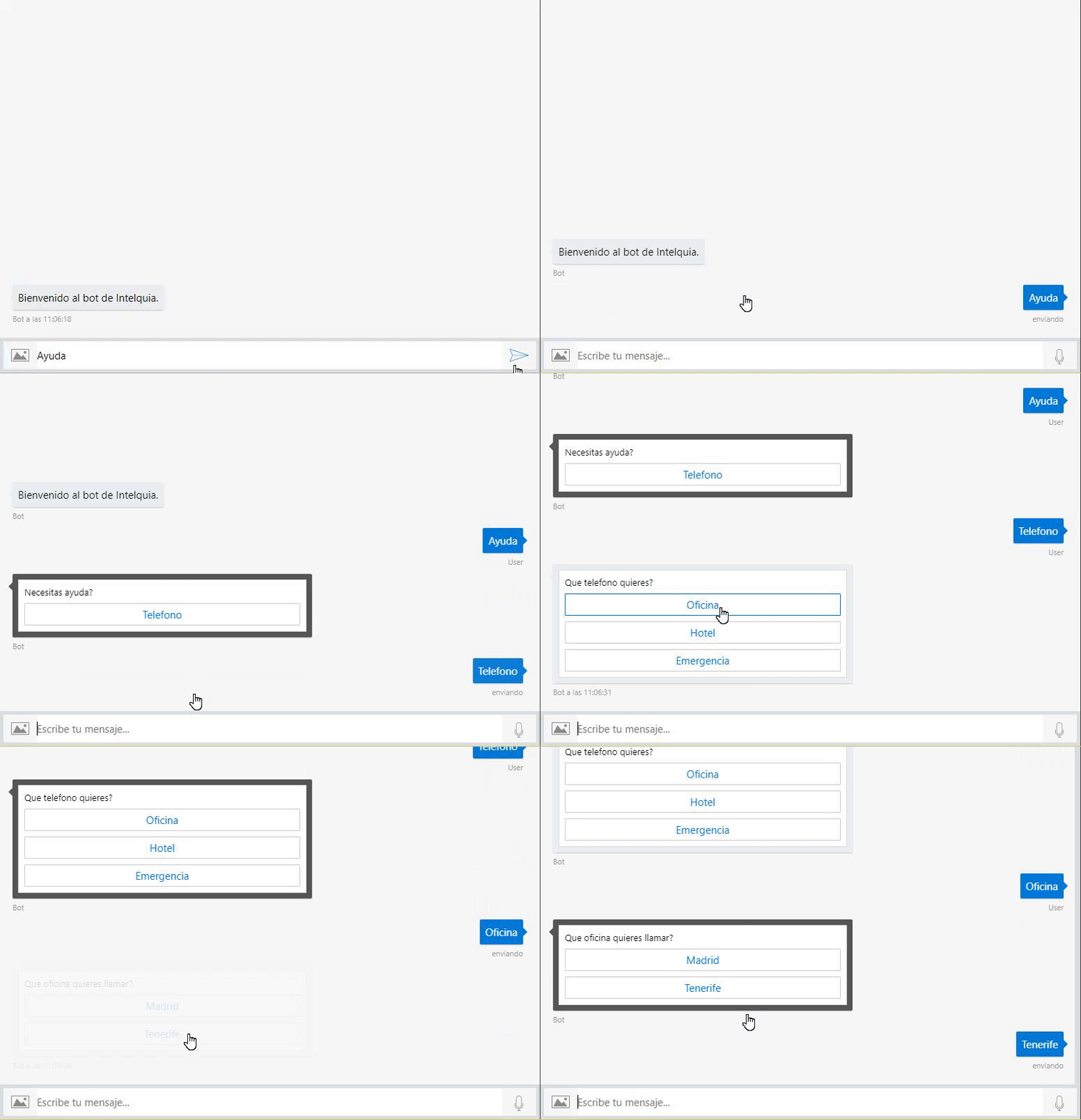
使用当前的方式,我们在对话中没有任何类型的流程,例如,如果您想寻求帮助,然后会显示一个包含不同选项的菜单,然后在选择其中一个选项后,会显示另一个菜单。这将产生 2 个或更多 responses。 所以这意味着使用我们之前使用的集成测试解决方案将不起作用。
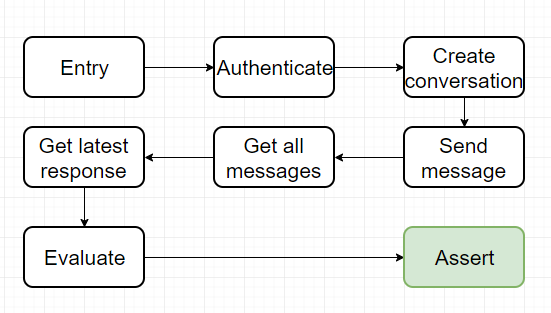
下面是单个案例的集成测试如何工作的图表。
这是我们如何使当前的集成测试解决方案适应流程案例的图表。

以下解释不会涵盖Bot Framework如何工作的所有基本信息,如果您不明白,请去查看官方文档。
示例案例
在以下指南中,我将使用带有我创建的流程对话的机器人,该机器人会寻求帮助,然后选择不同的选项。
新的 JSON 结构
现在我们在与机器人对话时拥有多个 request,我们需要修改 json 结构以添加我们将要执行的所有 request。
{
  "secret": "direct-line-secret",
  "directlineGenerateTokenEndpoint":
    "https://directline.botframework.com/v3/directline/tokens/generate",
  "directlineConversationEndpoint":
    "https://directline.botframework.com/v3/directline/conversations/",
  "entries": [
    {
      "name": "PedirAyuda",
      "requests": [
        {
          "type": "message",
          "text": "Ayuda",
          "from": {
            "id": "default-user",
            "name": "User"
          },
          "locale": "es",
          "textFormat": "plain",
          "timestamp": "2018-04-09T08:04:37.195Z",
          "channelData": {
            "clientActivityId": "1523261059363.6264723268323733.0"
          },
          "entities": [
            {
              "type": "ClientCapabilities",
              "requiresBotState": true,
              "supportsTts": true,
              "supportsListening": true
            }
          ],
          "id": "61hacck8j6jg"
        },
        {
          "type": "message",
          "text": "Telefono",
          "from": {
            "id": "default-user",
            "name": "User"
          },
          "locale": "es",
          "textFormat": "plain",
          "timestamp": "2018-04-09T08:04:37.195Z",
          "channelData": {
            "clientActivityId": "1523261059363.6264723268323733.0"
          },
          "entities": [
            {
              "type": "ClientCapabilities",
              "requiresBotState": true,
              "supportsTts": true,
              "supportsListening": true
            }
          ],
          "id": "61hacck8j6jg"
        },
        {
          "type": "message",
          "text": "Oficina",
          "from": {
            "id": "default-user",
            "name": "User"
          },
          "locale": "es",
          "textFormat": "plain",
          "timestamp": "2018-04-09T08:04:37.195Z",
          "channelData": {
            "clientActivityId": "1523261059363.6264723268323733.0"
          },
          "entities": [
            {
              "type": "ClientCapabilities",
              "requiresBotState": true,
              "supportsTts": true,
              "supportsListening": true
            }
          ],
          "id": "61hacck8j6jg"
        },
        {
          "type": "message",
          "text": "Tenerife",
          "from": {
            "id": "default-user",
            "name": "User"
          },
          "locale": "es",
          "textFormat": "plain",
          "timestamp": "2018-04-09T08:04:37.195Z",
          "channelData": {
            "clientActivityId": "1523261059363.6264723268323733.0"
          },
          "entities": [
            {
              "type": "ClientCapabilities",
              "requiresBotState": true,
              "supportsTts": true,
              "supportsListening": true
            }
          ],
          "id": "61hacck8j6jg"
        }
      ],
      "response": {
        "type": "message",
        "timestamp": "2018-04-09T08:04:37.901Z",
        "localTimestamp": "2018-04-09T09:04:37+01:00",
        "serviceUrl": "http://localhost:50629",
        "channelId": "emulator",
        "from": {
          "id": "j98bbdf097a",
          "name": "Bot"
        },
        "conversation": {
          "id": "eabcie4be8ak"
        },
        "recipient": {
          "id": "default-user"
        },
        "locale": "es",
        "text": "922920252",
        "attachments": [],
        "entities": [],
        "replyToId": "61hacck8j6jg",
        "id": "47me557ikbf7"
      },
      "assert": "Request.Text == Response.Text"
    }
  ]
}
正如您所看到的,有一个重要的变化,request 现在是 requests。这意味着现在我们有一个 List<Activity> 而不是单个 activity。
新对象
之前我们为单个案例设置了对象:TestEntry 和 TestEntryCollection。对于流程案例,我们将创建新对象:TestEntryFlow 和 TestEntryFlowCollection。
TestEntryFlow
该对象适用于集合中的每个条目,请注意 Requests 对象现在是一个 List<Activity>,而不是我之前提到的单个 Activity。
由于我们将多次询问机器人,因此我们需要将多个 activities 发送到对话中。
public class TestEntryFlow
{
    /// <summary>
    /// Entry name
    /// </summary>
    [JsonProperty("name")]
    public string Name { get; set; }
    /// <summary>
    /// Activity requested by the entry
    /// </summary>
    [JsonProperty("requests")]
    public List<Activity> Requests { get; set; }
    /// <summary>
    /// Activity response expected by the entry
    /// </summary>
    [JsonProperty("response")]
    public Activity Response { get; set; }
    /// <summary>
    /// Assert value in string
    /// </summary>
    [JsonProperty("assert")]
    public string Assert { get; set; }
}
TestEntiresCollection
该对象将包含 DirectLine 的相关信息,例如 secret 和端点,以及我们将测试的 Entries 列表。
请注意,Entries 现在是 TestEntryFlow 的列表,而不是 TestEntry。
public class TestEntryFlowCollection
{
    /// <summary>
    /// DirectLine Secret
    /// </summary>
    [JsonProperty("secret")]
    public string Secret { get; set; }
    /// <summary>
    /// Endpoint to get the token using the secret for DirectLine
    /// </summary>
    [JsonProperty("directlineGenerateTokenEndpoint")]
    public string DirectLineGenerateTokenEndpoint { get; set; }
    /// <summary>
    /// Endpoint for a conversation in DirectLine
    /// </summary>
    [JsonProperty("directlineConversationEndpoint")]
    public string DirectLineConversationEndpoint { get; set; }
    /// <summary>
    /// Entries list
    /// </summary>
    [JsonProperty("entries")]
    public List<TestEntryFlow> Entries { get; set; }
}
为流程案例创建 TestMethod
新流程
首先,再看一遍图(和我上面贴的一样)。
正如您所看到的,进行测试的流程结构几乎相同:
获取信息
认证
创建对话这里发生了变化,现在我们必须多次向对话发送所有请求。为了做到这一点,我们必须循环每个请求,将其发送到机器人,然后将最新响应与我们的预期响应进行比较。
发送所有请求
获取所有消息
获取最新回复
与预期响应进行比较
断言结果
代码
首先,我们需要从文件中获取信息,这与我们之前处理单例时的情况相同。
// Load entries from file
var path = System.IO.File.ReadAllText(@"C:\dataFlow.json");

// Deserialize to object
var data = JsonConvert.DeserializeObject<TestEntryFlowCollection>(path);
现在我们必须循环 data.entries 的每个 TestEntryFlow,这样我们就可以遵循在单个情况下执行的相同流程,直到新部分,我们在 requests 中循环。
/// Arrange with current requested values
string token, newToken, conversationId;
Activity latestResponse = new Activity();

/// Act for step

/// 1 - Get token using secret from DirectLine in BotFramework panel
token = Utils.uploadString<DirectLineAuth>(data.Secret, data.DirectLineGenerateTokenEndpoint, "").token;

/// 2 - Create a new conversation
var createdConversation = Utils.uploadString<DirectLineAuth>(token, data.DirectLineConversationEndpoint, "");

// This returns a new token and a conversationId
newToken = createdConversation.token;
conversationId = createdConversation.conversationId;

/// 3 - Send an activity to the conversation with new token and conversationId
string directlineConversationActivitiesEndpoint = data.DirectLineConversationEndpoint + conversationId + "/activities";
接下来的步骤非常简单,我们必须循环 entry.requests 并将每个 activity 发送到对话。
foreach (Activity step in entry.Requests)
{
    if (step.Type == ActivityTypes.Message)
    {
        /// Step
        Utils.uploadString<DirectLineAuth>(newToken, directlineConversationActivitiesEndpoint, JsonConvert.SerializeObject(step));

        /// 4 - Get all activities, we get a List<activity> and a watermark
        var getLastActivity = Utils.downloadString<ActivityResponse>(newToken, directlineConversationActivitiesEndpoint);

        /// 5 - Get the latest activity which is the response we should be expecting
        latestResponse = getLastActivity.activities[Int32.Parse(getLastActivity.watermark)];
    }
}
我们使用 watermark 来获取最新消息,watermark 是 DirectLine API 在请求对话信息时返回的值。
之后,我们只需用 latestReponse 和 expectedResponse 填充 globals 即可。
/// Arrange with new values
var globals = new Objects.Globals { Request = entry.Response, Response = latestResponse };
为了完成这个案例,我们评估 entry 中的 assert 字符串。
/// Assert
Assert.IsTrue(await CSharpScript.EvaluateAsync<bool>(entry.Assert, globals: globals));
最终代码
[TestMethod]
public async Task ShouldTestFlowCases()
{
    // Load entries from file
    var path = System.IO.File.ReadAllText(@"C:\dataFlow.json");

    // Deserialize to object
    var data = JsonConvert.DeserializeObject<TestEntryFlowCollection>(path);

    /// Flow: Arrange -> Act -> arrange -> assert
    foreach (TestEntryFlow entry in data.Entries)
    {
        /// Arrange with current requested values
        string token, newToken, conversationId;
        Activity latestResponse = new Activity();

        /// Act for step

        /// 1 - Get token using secret from DirectLine in BotFramework panel
        token = Utils.uploadString<DirectLineAuth>(data.Secret, data.DirectLineGenerateTokenEndpoint, "").token;

        /// 2 -Create a new conversation
        var createdConversation = Utils.uploadString<DirectLineAuth>(token, data.DirectLineConversationEndpoint, "");

        // This returns a new token and a conversationId
        newToken = createdConversation.token;
        conversationId = createdConversation.conversationId;

        /// 3 - Send an activity to the conversation with new token and conversationId
        string directlineConversationActivitiesEndpoint = data.DirectLineConversationEndpoint + conversationId + "/activities";

        foreach (Activity step in entry.Requests)
        {
            if (step.Type == ActivityTypes.Message)
            {
                /// Step
                Utils.uploadString<DirectLineAuth>(newToken, directlineConversationActivitiesEndpoint, JsonConvert.SerializeObject(step));

                /// 4 - Get all activities, we get a List<activity> and a watermark
                var getLastActivity = Utils.downloadString<ActivityResponse>(newToken, directlineConversationActivitiesEndpoint);

                /// 5 - Get the latest activity which is the response we should be expecting
                latestResponse = getLastActivity.activities[Int32.Parse(getLastActivity.watermark)];
            }
        }

        /// Arrange with new values
        var globals = new Objects.Globals { Request = entry.Response, Response = latestResponse };

        /// Assert
        Assert.IsTrue(await CSharpScript.EvaluateAsync<bool>(entry.Assert, globals: globals));
    }

    await Task.CompletedTask;
}
改进
我确实相信更好的流程是可能的,但这种改进意味着 JSON 结构也应该改变。另外,为了实现这一点,json 必须更加填充。
为了更好地进行测试,我们应该为每个 request 提供一个 response,并且每次发送消息时都应该进行断言。我们现在这样做的方法是存储所有 requests 和 最终 response 。
我制作了一个图表来展示它的外观。
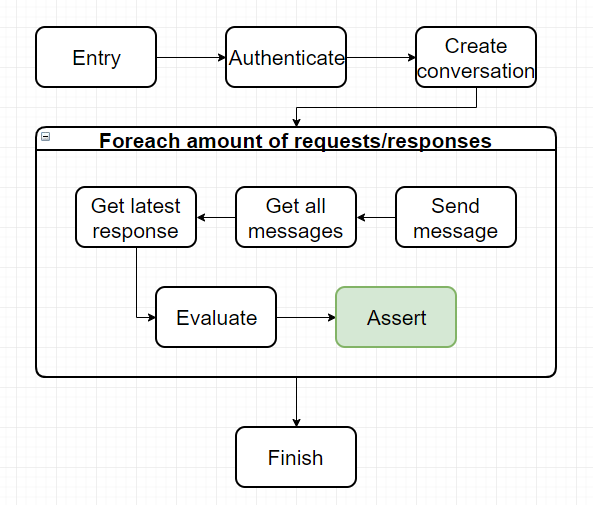
我强烈认为这种方式总体上对于测试的完整性要好得多,因为您正在测试流程中的几乎所有行为,而不仅仅是测试最终响应。
这就是本指南的全部内容,请记住,本指南是单个案例指南的延续,如果您感到迷茫,请查看该指南,该指南更长并且对所有内容都有更多解释。
请记住,所有代码都存储在我的 github 中的 this 存储库中。
祝你有美好的一天!