使用Bot Framework和DirectLine集成测试(3)
这是指南的最新部分,在这部分中,我们将评估 json 中断言中的文本。
现在我们使用了 request 并作为 activity 发送给机器人,我们得到了 response,我们必须将 json 中的 assert(我们存储在 json 中的响应,这是预期响应)与我们从机器人获得的响应进行比较。
以下解释不会涵盖Bot Framework如何工作的所有基本信息,如果您不明白,请去查看官方文档。
将 Microsoft.CodeAnalysis 添加到解决方案中
首先,我们必须将 CodeAnalysis 作为 NuGet 包包含进来。
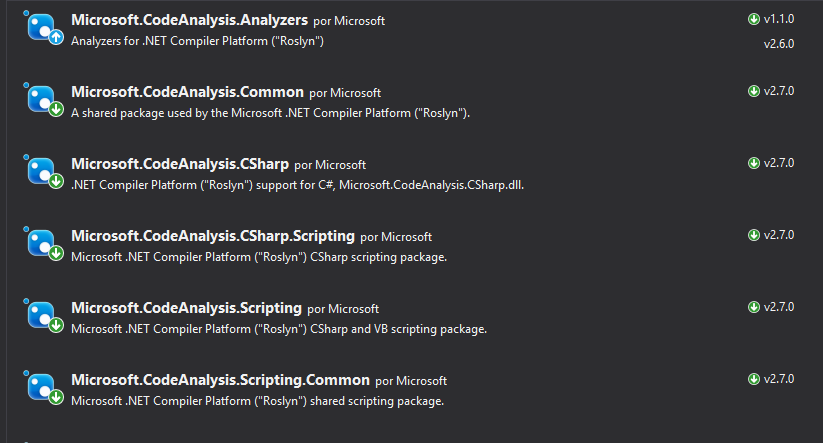
安装后,记得将软件包添加到.cs文件中。
using Microsoft.CodeAnalysis.CSharp.Scripting;
创建一个 Globals 对象
为了评估,我们必须将参数传递给评估器。该评估器需要一个配置文件。
 /// <summary>
/// Object to pass parameters to Roslyn compiler
/// </summary>
public class Globals
{
    /// <summary>
    /// ExpectedResponse
    /// </summary>
    public Activity Request;
    /// <summary>
    /// ReceivedResponse
    /// </summary>
    public Activity Response;
}
这部分非常重要,在该配置文件中,我们将包含要比较的对象,因此对于我们来说,我们需要向其传递 预期响应 和 收到的响应。
有了这些信息,它将使用 json 文件中的 assert 并评估其中的内容。
/// Arrange with new values
var globals = new Objects.Globals { Request = entry.Response, Response = latestResponse };

/// Assert
Assert.IsTrue(await CSharpScript.EvaluateAsync<bool>(entry.Assert, globals: globals));
** EvaluateAsync<T> 评估并返回 T,在我们的例子中,我们传递 string 进行评估,并传递 globals,其中包含要评估的数据。**
我将尝试用一个示例来解释这一点,使用一个条目(具有名称、请求、响应和断言)。
{
      "name": "DecirHola",
      "request": {
        "type": "message",
        "text": "Hola",
        "from": {
          "id": "default-user",
          "name": "User"
        },
        "locale": "es",
        "textFormat": "plain",
        "timestamp": "2018-04-09T08:04:37.195Z",
        "channelData": {
          "clientActivityId": "1523261059363.6264723268323733.0"
        },
        "entities": [
          {
            "type": "ClientCapabilities",
            "requiresBotState": true,
            "supportsTts": true,
            "supportsListening": true
          }
        ],
        "id": "61hacck8j6jg"
      },
      "response": {
        "type": "message",
        "timestamp": "2018-04-09T08:04:37.901Z",
        "localTimestamp": "2018-04-09T09:04:37+01:00",
        "serviceUrl": "http://localhost:50629",
        "channelId": "emulator",
        "from": {
          "id": "j98bbdf097a",
          "name": "Bot"
        },
        "conversation": {
          "id": "eabcie4be8ak"
        },
        "recipient": {
          "id": "default-user"
        },
        "locale": "es",
        "text": "No tengo respuesta para eso.",
        "attachments": [],
        "entities": [],
        "replyToId": "61hacck8j6jg",
        "id": "47me557ikbf7"
      },
      "assert": "Request.Text == Response.Text"
    }
让我们从这个条目中得到重要的东西,首先是断言 "assert": "Request.Text == Response.Text",这意味着它将比较 Request.Text 与 Response.Text,并以布尔值形式返回值。
但是当我们调用函数 await CSharpScript.EvaluateAsync<bool>(entry.Assert, globals: globals) 时,我们传递 2 个参数:
string要评估的字符串 ->"Request.Text == Response.Text"- 评估者的
globals数据 -> 在这种情况下,我们必须给出Request和Response,请求是我们的 预期响应,响应是 收到的响应。
当我们在求值器中填充数据时,现在我们可以使用字符串并求值,因此它将返回 true 或 false。
完成
我们完成了,在这里你可以看到完成的TestMethod
[TestMethod]
public async Task ShouldTestSingleCases()
{
    // Load entries from file
    var path = System.IO.File.ReadAllText(@"C:\data.json");

    // Deserialize to object
    var data = JsonConvert.DeserializeObject<TestEntriesCollection>(path);

    /// Flow: Arrange -> Act -> arrange -> assert

    foreach (TestEntry entry in data.Entries)
    {
        /// Arrange with current requested values
        string token, newToken, conversationId;

        if (entry.Request.Type == ActivityTypes.Message)
        {
            /// Act

            /// 1 - Get token using secret from DirectLine in BotFramework panel
            token = Utils.uploadString<DirectLineAuth>(data.Secret, data.DirectLineGenerateTokenEndpoint, "").token;

            /// 2 -Create a new conversation
            var createdConversation = Utils.uploadString<DirectLineAuth>(token, data.DirectLineConversationEndpoint, "");

            // This returns a new token and a conversationId
            newToken = createdConversation.token;
            conversationId = createdConversation.conversationId;

            /// 3 - Send an activity to the conversation with new token and conversationId
            string directlineConversationActivitiesEndpoint = data.DirectLineConversationEndpoint + conversationId + "/activities";
            Utils.uploadString<DirectLineAuth>(newToken, directlineConversationActivitiesEndpoint, JsonConvert.SerializeObject(entry.Request));

            /// 4 - Get all activities, we get a List<activity> and a watermark
            var getLastActivity = Utils.downloadString<ActivityResponse>(newToken, directlineConversationActivitiesEndpoint);

            /// 5 - Get the latest activity which is the response we should be expecting
            var latestResponse = getLastActivity.activities[Int32.Parse(getLastActivity.watermark)];

            /// Arrange with new values
            var globals = new Objects.Globals { Request = entry.Response, Response = latestResponse };

            /// Assert
            Assert.IsTrue(await CSharpScript.EvaluateAsync<bool>(entry.Assert, globals: globals));
        }
    }
    await Task.CompletedTask;
}
图表
这是我们为达到这一点所遵循的所有流程的图表,希望如果您不理解某些内容,这可以让您明白。

这就是全部,这是针对单个情况完成的,其中情况是 1 对 1,用户发送 activity 并且机器人返回另一个单个 activity。
我希望你喜欢它,下一篇将是具有多个响应的测试流程案例。
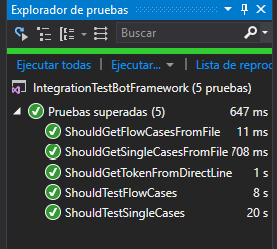
请记住,所有代码都存储在我的 github 中的 this 存储库中。