使用 .NET Framework 中的嵌入式和外部资源的自定义语言
简介
在工作中,我们遇到了一个正常的问题,我确信很多开发人员都必须处理这个问题,即来自向其客户提供我们服务的客户的语言和自定义语言。
例如,假设基本语言使用非正式语言,而客户需要正式语言,因为他们的客户是老年人。
另请注意,该解决方案适用于多种语言,我们将使用英语和西班牙语。
我的母语不是英语,对于教程中的任何错误,我深表歉意。如果您发现错误并想要修复它们,您可以在 this repo 上打开拉取请求,我很乐意批准它!
资源
资源是扩展名为 .resx 的 XML 文件,它们具有键/值结构,如下所示:
<?xml version="1.0" encoding="utf-8"?>
<root>
  <xsd:schema id="root" xmlns="" xmlns:xsd="http://www.w3.org/2001/XMLSchema" xmlns:msdata="urn:schemas-microsoft-com:xml-msdata">
    <xsd:import namespace="http://www.w3.org/XML/1998/namespace" />
    <xsd:element name="root" msdata:IsDataSet="true">
      <xsd:complexType>
        <xsd:choice maxOccurs="unbounded">
          <xsd:element name="metadata">
            <xsd:complexType>
              <xsd:sequence>
                <xsd:element name="value" type="xsd:string" minOccurs="0" />
              </xsd:sequence>
              <xsd:attribute name="name" use="required" type="xsd:string" />
              <xsd:attribute name="type" type="xsd:string" />
              <xsd:attribute name="mimetype" type="xsd:string" />
              <xsd:attribute ref="xml:space" />
            </xsd:complexType>
          </xsd:element>
          <xsd:element name="assembly">
            <xsd:complexType>
              <xsd:attribute name="alias" type="xsd:string" />
              <xsd:attribute name="name" type="xsd:string" />
            </xsd:complexType>
          </xsd:element>
          <xsd:element name="data">
            <xsd:complexType>
              <xsd:sequence>
                <xsd:element name="value" type="xsd:string" minOccurs="0" msdata:Ordinal="1" />
                <xsd:element name="comment" type="xsd:string" minOccurs="0" msdata:Ordinal="2" />
              </xsd:sequence>
              <xsd:attribute name="name" type="xsd:string" use="required" msdata:Ordinal="1" />
              <xsd:attribute name="type" type="xsd:string" msdata:Ordinal="3" />
              <xsd:attribute name="mimetype" type="xsd:string" msdata:Ordinal="4" />
              <xsd:attribute ref="xml:space" />
            </xsd:complexType>
          </xsd:element>
          <xsd:element name="resheader">
            <xsd:complexType>
              <xsd:sequence>
                <xsd:element name="value" type="xsd:string" minOccurs="0" msdata:Ordinal="1" />
              </xsd:sequence>
              <xsd:attribute name="name" type="xsd:string" use="required" />
            </xsd:complexType>
          </xsd:element>
        </xsd:choice>
      </xsd:complexType>
    </xsd:element>
  </xsd:schema>
  <resheader name="resmimetype">
    <value>text/microsoft-resx</value>
  </resheader>
  <resheader name="version">
    <value>2.0</value>
  </resheader>
  <resheader name="reader">
    <value>System.Resources.ResXResourceReader, System.Windows.Forms, Version=4.0.0.0, Culture=neutral, PublicKeyToken=b77a5c561934e089</value>
  </resheader>
  <resheader name="writer">
    <value>System.Resources.ResXResourceWriter, System.Windows.Forms, Version=4.0.0.0, Culture=neutral, PublicKeyToken=b77a5c561934e089</value>
  </resheader>
  <data name="Action_cancel" xml:space="preserve">
    <value>Finish</value>
  </data>
  <data name="Action_greeting" xml:space="preserve">
    <value>Hello</value>
  </data>
</root>
我们将为两种不同的语言创建资源:英语和西班牙语,因此文件的命名法将为:resources.ISOLANGUAGECODE.resx,例如:resource.es.resx 为西班牙语,resource.resx 为英语,如果我们稍后要添加德语,文件将被命名为 resource.de.resx。
嵌入资源
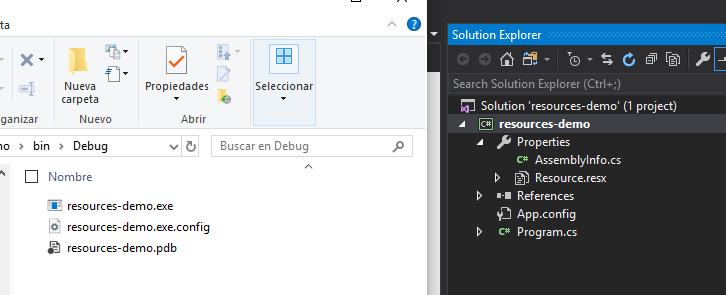
内嵌资源,项目编译时会添加到dll里面。
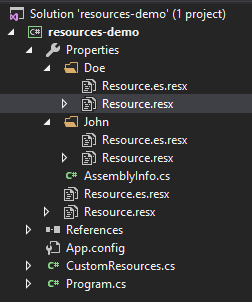
这是一个带有嵌入资源的图像,如您所见,文件 Resource.resx 在编译中看不到。
外部资源
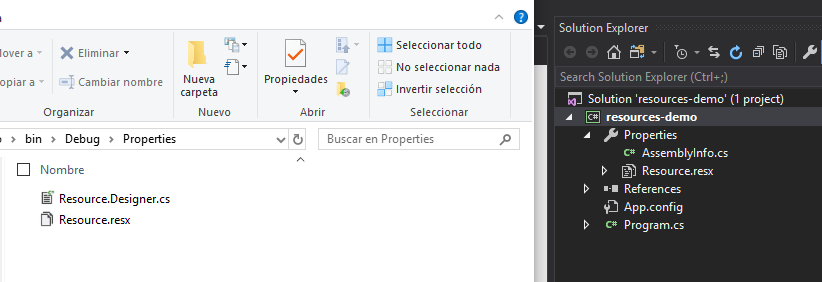
另一方面,外部资源或未嵌入的资源是编译后将添加到文件夹中的资源。
资源文件 (.resx) 将位于 Properties 文件夹内
构建项目
让我们从 .NET Framework 中的控制台项目开始。
创建嵌入资源文件
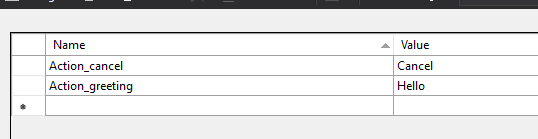
添加一个带有几个键的资源文件,并确保它是嵌入式资源,稍后我们将使用它来更新外部资源。
创建外部资源文件
为了将外部资源与嵌入资源分开,我们将在一个带有名称的文件夹中添加外部资源,以便以后可以轻松访问它们。
提示:要在 Properties 文件夹内添加文件夹,请在外部创建并将其移至内部,Visual Studio 不允许您创建它
执行与嵌入资源相同的操作,然后转到文件的 properties 和 Advanced、Build action 内部,并将其更改为:Content 并将 Copy to Output Dictionary 更改为 Copy if newer。
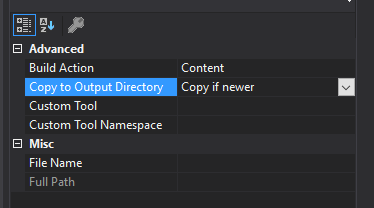
它应该是这样的:
添加一个键到app.config
因为我们是很酷的开发人员,喜欢把一切都做好,并且 不 更改每个客户端的代码,所以让我们向 appconfig 添加一个键,该键将具有我们将要查找资源文件的文件夹的名称
<?xml version="1.0" encoding="utf-8" ?>
<configuration>
    <startup>
        <supportedRuntime version="v4.0" sku=".NETFramework,Version=v4.7.2" />
    </startup>
  <appSettings>
    <add key="CustomResources.Folder" value="John" />
  </appSettings>
</configuration>
```因此,稍后,当我们查找资源时,它将查找 `Properties.John` 而不是 `Properties.Doe`。

此外,当应用程序已经部署时,这使得更改变得更容易,因为您可以轻松更改 app.config。

## 访问嵌入的资源文件

使用 .NET Framework 相当简单,因此为了访问嵌入式属性,我们只需使用 `Properties` 对象,该对象将资源文件作为属性,并且在该对象内部将包含 `resx` 文件中的所有键/值。

```csharp
static void Main(string[] args)
{
    var hello = Properties.Resource.Action_greeting;
    var bye = Properties.Resource.Action_cancel;

    Console.WriteLine($"Action_greeting value: {hello}, Action_cancel value: {bye}");

    Console.Read();
}
运行它应该向我们展示如下内容:
Action_greeting value: Hello, Action_cancel value: Cancel
访问外部资源文件
这部分几乎相同,您可以通过 Properties 对象访问资源文件。
var hello = Properties.Resource.Action_greeting;
var bye = Properties.Resource.Action_cancel;

var johnhello = Properties.John.Resource.Action_greeting;
var johnbye = Properties.John.Resource.Action_cancel;

var doehello = Properties.Doe.Resource.Action_greeting;
var doebye = Properties.Doe.Resource.Action_cancel;
问题
使用此方法的主要问题是每个键都是对象内部的属性,因此我们必须像之前看到的那样调用它。如果要调用John资源文件的密钥Action_greeting,我们必须使用以下Properties.John,然后使用Resource.Action_greeting。
这就是问题所在。
那是因为,如果我们正在为很多客户开发应用程序,那么改变我们为每个客户调用资源文件的方式是一个坏主意。
您能想象吗? 为每个客户端编译应用程序并将 John 更改为 Doe,然后更改为其他内容。 这太疯狂了!
解决方案
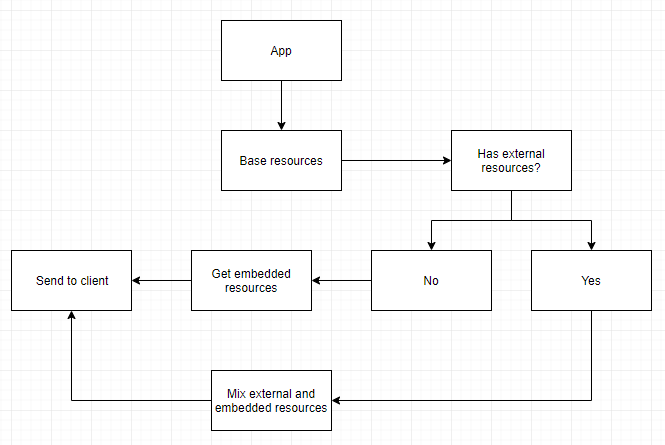
我们的团队领导想到了一个非常好的方法,就像后备系统一样,我们必须有一个资源的基本模型,然后对于每个客户端都有一个资源文件,它将用他们的资源更新文件,最后我们得到一个资源列表。
如果客户不需要自定义资源,我们将使用基础资源;如果客户需要,我们将使用他们的资源。
要将其放入清单中,我们必须这样做:
- 找到一种方法将所有键/值映射到嵌入资源的字典。
- 找到一种方法将所有键/值映射到外部资源的字典
- 混合两个文件并为每种语言提供一个字典
- 创建一个访问字典并返回值的方法
图表
让我们编码
首先,让我们创建一个单独的类,其中我们将拥有所有逻辑,从获取资源文件到混合它们并返回值。该类将被称为 CustomResources。
看起来是这样的:
    class CustomResources
    {

        private static Dictionary<string, string> _ResourcesEnglish;
        private static Dictionary<string, string> ResourcesEnglish;

        private static Dictionary<string, string> _ResourcesSpanish;
        private static Dictionary<string, string> ResourcesSpanish;


        private static Dictionary<string, string> OverwriteDictionary(Dictionary<string, string> currentDictionary, Dictionary<string, string> newDictionary, bool addIfDoesntExist = false)
        {
            ...
        }

        private static Dictionary<string, string> GetDictionaryFromEmbedded(string embedded, string cultureInfoCode)
        {
            ...
        }

        private static Dictionary<string, string> GetDictionaryFromFile(string file)
        {
            ...
        }

        public static string GetText(string key)
        {
            ...
        }

        public static string GetText(string key, string language)
        {
            ...
        }
    }
请注意,我们正在实现属性的延迟加载,这有助于提高性能并使其加载字典一次。
GetDictionaryFromEmbedded:从嵌入资源返回字典。GetDictionaryFromFile:从外部资源返回字典。OverwriteDictionary:混合两个字典并返回一个字典。GetText:返回给定键的值
从嵌入资源到字典
我们必须从 xml 文件中获取所有属性并返回一个字典:
private static Dictionary<string, string> GetDictionaryFromEmbedded(string embedded, string cultureInfoCode)
{
    Dictionary<string, string> res = new Dictionary<string, string>();

    try
    {
        ResourceManager rm = new ResourceManager(embedded, Assembly.GetExecutingAssembly());
        var resourceSet = rm.GetResourceSet(new CultureInfo(cultureInfoCode), true, true);

        var resourceDictionary = resourceSet.Cast<DictionaryEntry>()
                            .ToDictionary(r => r.Key.ToString(),
                                          r => r.Value.ToString());
        res = resourceDictionary;
    }
    catch (Exception e)
    {
        string a = e.Message;
        // Error getting resource file
    }

    return res;
}
两件事:- 请注意,它需要一个名为 embedded 的参数,该参数是您可以在设计器中看到的文件的名称,在我们的例子中是:resources-demo.Properties.Resource。
- 我们还有一个名为 cultreInfoCode 的参数,它是要选择的语言的代码。对我们来说幸运的是,.NET Framework 为我们完成了这项工作,我们不需要做任何事情,只需设置我们想要英语或西班牙语,它就会在
resource.es.resx或resource.resx之间进行选择
从外部资源到字典
从文件获取有点困难,但并不难,我们必须获取可执行文件的当前位置,连接资源文件的位置,然后将其解析为字典。
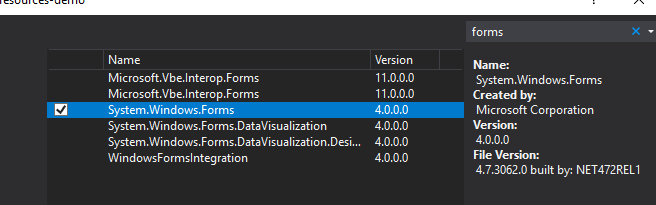
但首先您必须添加对 System.Windows.Forms 的引用,才能访问 ResXResourceReader。
现在我们的 GetDictionaryFromFile 方法:
private static Dictionary<string, string> GetDictionaryFromFile(string file)
{
    Dictionary<string, string> res = new Dictionary<string, string>();
    string currentPath = (System.IO.Path.GetDirectoryName(System.Reflection.Assembly.GetExecutingAssembly().GetName().CodeBase) + file).Replace("file:\\", "");

    try
    {
        using (ResXResourceReader resxReader = new ResXResourceReader(currentPath))
        {
            foreach (DictionaryEntry entry in resxReader)
            {
                res.Add((string)entry.Key, (string)entry.Value);
            }
        }
    }
    catch (Exception e)
    {
        string a = e.Message;
    }

    return res;
}
文件参数需要填写从可执行文件到资源文件的位置,在我们的例子中是:"\\Properties\\John\\Resource.resx"。
混合字典
我们已经完成了,首先,请记住将 System.Configuration 添加到引用中,以便您可以访问 app.settings。
 private static Dictionary<string, string> OverwriteDictionary(Dictionary<string, string> currentDictionary, Dictionary<string, string> newDictionary, bool addIfDoesntExist = false)
{
    var identifier = ConfigurationManager.AppSettings["CustomResources.Folder"];
    if (String.IsNullOrEmpty(identifier))
        return currentDictionary;

    foreach (var item in newDictionary)
    {
        try
        {
            currentDictionary[item.Key] = item.Value;
        }
        catch (Exception)
        {
            if(addIfDoesntExist)
            currentDictionary.Add(item.Key, item.Value);
        }
    }

    return currentDictionary;
}
从字典中获取文本
创建一个调用选择语言的私有方法的公共方法:
private static string GetText(string key, string language)
{
    try
    {
        switch (language)
        {
            case "es":
                return ResourceSpanish[key];
            case "en":
            default:
                return ResourceEnglish[key];
        }
    }
    catch (Exception)
    {
        return $"No value with key: {key} and language: {language}";
    }
}
public static string GetText(string key)
{
    try
    {
        return GetText(key, Thread.CurrentThread.CurrentCulture.TwoLetterISOLanguageName);
        }
    catch (Exception)
    {
        return $"No value with key: {key}";
    }
}
请注意,如果要添加更多语言,则必须修改开关。
添加代码到属性 getter
由于我们现在拥有所有方法,因此我们可以修改公共属性的 getter 来获取值。
private static Dictionary<string, string> _ResourcesEnglish;
private static Dictionary<string, string> ResourcesEnglish
{
    get
    {
        if (_ResourcesEnglish == null)
        {
            var folderIndentifier = ConfigurationManager.AppSettings["CustomResources.Folder"]; ;
            var baseResources = GetDictionaryFromEmbedded("resources-demo.Properties.Resource");
            var customResources = GetDictionaryFromFile($"\\Properties\\{folderIndentifier}\\Resource.resx", "en");
            _ResourcesEnglish = OverwriteDictionary(baseResources, customResources);
        }

        return _ResourcesEnglish;
    }
}

private static Dictionary<string, string> _ResourcesSpanish;
private static Dictionary<string, string> ResourcesSpanish
{
    get
    {
        if (_ResourcesSpanish == null)
        {
            var folderIndentifier = ConfigurationManager.AppSettings["CustomResources.Folder"]; ;
            var baseResources = GetDictionaryFromEmbedded("resources-demo.Properties.Resources");
            var customResources = GetDictionaryFromFile($"\\Properties\\{folderIndentifier}\\Resources.es.resx", "es");
            _ResourcesSpanish = OverwriteDictionary(baseResources, customResources);
        }

        return _ResourcesSpanish;
    }
}
- 首先我们从app.settings中获取标识符。
- 然后我们得到基础资源,即嵌入的资源。
- 之后我们获取自定义资源,为此我们需要文件夹名称(即标识符)。
- 然后我们将它们混合并返回值。
所有这些都将在延迟加载后完成一次。
测试
与代码相关的所有内容都已完成,现在让我们测试一下,为了从字典中获取值,我们必须调用返回值的方法 CustomResources.GetText(string key) 。
更新整个资源文件
此测试是我们想要更新资源文件的整个键/值的情况,正如您在图片中看到的,我们具有相同的键但不同的值。
我们将测试 John,为了进行设置,我们将 app.config 设置为 <add key="CustomResources.Folder" value="John" />。
现在让我们检查我们的基础资源文件(Properties/Resource.es.resx):
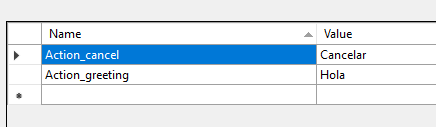
然后是我们的外部资源文件(Properties/John/Resource.es.resx):
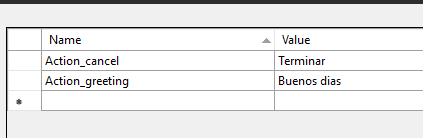
一切设置完毕后,我们运行控制台应用程序,让我们停止到属性的 get 部分并检查所有内容
folderIdentifier 具有应用程序设置的值:

baseResources 具有基础资源、嵌入资源的值:

customResources 具有文件夹 John 内的外部资源的值: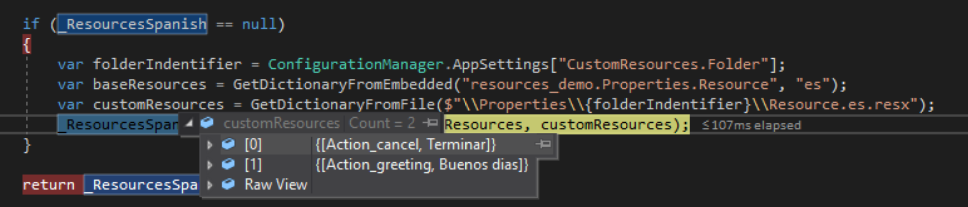
最后,_ResourcesSpanish 具有从基础资源到外部资源的混合值。
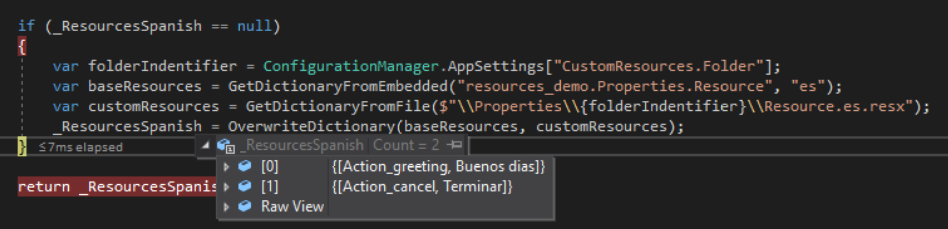
只更新一个
现在让我们测试相同但不同的场景,只需更新一个密钥并让另一个相同。

如您所见,这些文件对于 Action_greeting 具有相同的值含义,但对于 Action_cancel 具有不同的值,因此它应该仅更新 Action_cancel。
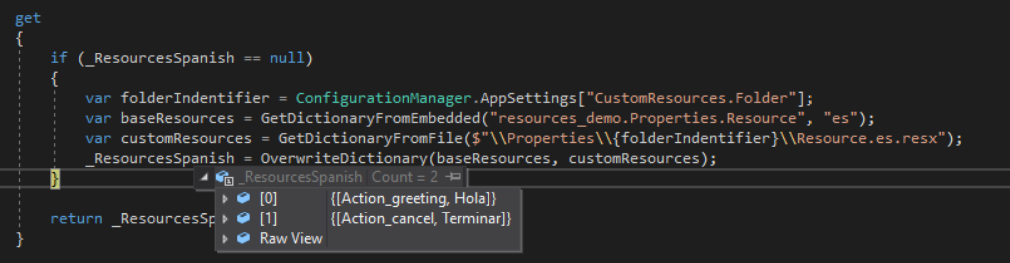
缺少资源文件
如果您不提供外部资源文件,那根本不重要,因为我们期望有一个文件,如果失败,它将返回一个空字典,并且当混合两个字典时,它将最终得到基本字典。
嵌入资源中缺少对
如果外部资源文件中有一对,默认情况下不会将其添加到最终字典中,您可以通过在混合两个字典时调用方法 OverwriteDictionary() 来更改这一点,并将参数 addIfDoesntExist 设置为 true。
不同的语言
正如你所看到的,我们没有指定任何语言,因为所有这些都是由调用 GetText(string key, string language) 的函数 GetText(string key) 完成的,参数 language 由 TwoLetterISOLanguageName 填充,它返回线程的当前语言。
就我而言,我将西班牙语作为默认语言,这就是为什么它总是以西班牙语显示,但我们也可以尝试使用英语。
让我们编写一些代码并构建一些东西来检查西班牙语和英语。
static void Main(string[] args)
{

    // System.Threading.Thread.CurrentThread.CurrentUICulture = new CultureInfo("en-US");
    System.Threading.Thread.CurrentThread.CurrentCulture = new CultureInfo("en-US");
    WriteText("Action_greeting");
    WriteText("Action_cancel");

    // System.Threading.Thread.CurrentThread.CurrentUICulture = new CultureInfo("es-ES");
    System.Threading.Thread.CurrentThread.CurrentCulture = new CultureInfo("es-ES");
    WriteText("Action_greeting");
    WriteText("Action_cancel");

    Console.Read();
}

private static void WriteText(string key) {
    Console.WriteLine($"[Culture: {System.Threading.Thread.CurrentThread.CurrentCulture}] Key: {key} -> value: {CustomResources.GetText(key)}");
}
运行这个,输出应该是这样的:
[Culture: en-US] Key: Action_greeting -> value: Hello
[Culture: en-US] Key: Action_cancel -> value: Finish
[Culture: es-ES] Key: Action_greeting -> value: Hola
[Culture: es-ES] Key: Action_cancel -> value: Terminar

前两个值来自 resources.resx,均为英语,最后两个值均来自西班牙语,并且这些值是从 resources.es.resx 检索的。
就是这样
在本教程中,我们找到了一种混合嵌入式和外部语言资源的方法,这是我们团队中遇到的问题的解决方案,从那时起它就一直运行没有任何问题。
您可以在[此处](https://github.com/emimontesdeoca/resources-demo查看源代码。
如果您有任何问题,请随时通过 @emimontesdeocaa 发推文给我,我会在有时间时回复您。