Integration test using Bot Framework and DirectLine (3)
This is the latest part of the guide, in this part, we will be evaluating the text from the assert in the json.
Now that we used the request and sended as an activity to the bot, we got the response and we have to compare what the assert in the json(the response we have stored in the json, this is the expected response) with the response we got from the bot.
The following explanation won’t cover all the basic information of how the Bot Framework works, if you dont undestand, please go and check the official documentation.
Adding Microsoft.CodeAnalysis to the solution
First of all, we have to include CodeAnalysis as a NuGet package.
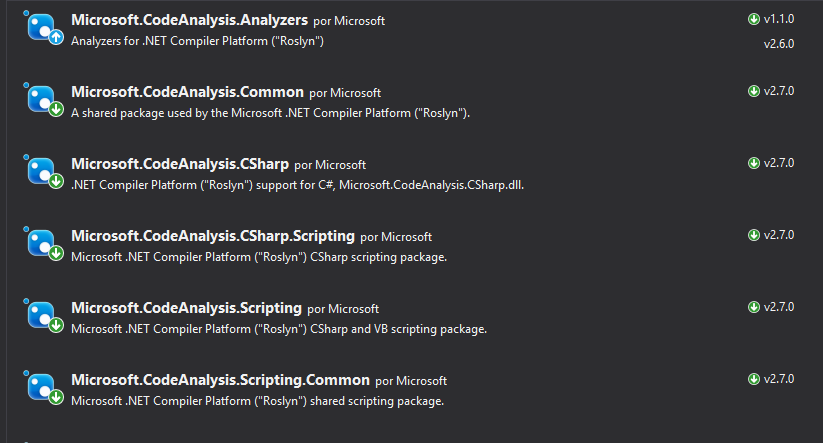
After installation, remember to add the pacakge to the .cs file.
using Microsoft.CodeAnalysis.CSharp.Scripting;
Creating a Globals object
In order to evaluate, we have to pass the parameters to the evaluator. This evaluator needs a configuration file.
 /// <summary>
/// Object to pass parameters to Roslyn compiler
/// </summary>
public class Globals
{
    /// <summary>
    /// ExpectedResponse
    /// </summary>
    public Activity Request;
    /// <summary>
    /// ReceivedResponse
    /// </summary>
    public Activity Response;
}
This part is very important, in that configuration file we will be including what objects we will be comparing, so for us, we need to pass it the expected respose and the response received.
With that information, it will be using the assert in the json file and it will be evaluating what is says.
/// Arrange with new values
var globals = new Objects.Globals { Request = entry.Response, Response = latestResponse };

/// Assert
Assert.IsTrue(await CSharpScript.EvaluateAsync<bool>(entry.Assert, globals: globals));
The EvaluateAsync<T> evaluates and returns T, in our case we pass the string to evaluate and globals, which has the data where it will evaluate.
I’m going to try to explain this with an example, using an entry(which has a name, request, response and assert).
{
      "name": "DecirHola",
      "request": {
        "type": "message",
        "text": "Hola",
        "from": {
          "id": "default-user",
          "name": "User"
        },
        "locale": "es",
        "textFormat": "plain",
        "timestamp": "2018-04-09T08:04:37.195Z",
        "channelData": {
          "clientActivityId": "1523261059363.6264723268323733.0"
        },
        "entities": [
          {
            "type": "ClientCapabilities",
            "requiresBotState": true,
            "supportsTts": true,
            "supportsListening": true
          }
        ],
        "id": "61hacck8j6jg"
      },
      "response": {
        "type": "message",
        "timestamp": "2018-04-09T08:04:37.901Z",
        "localTimestamp": "2018-04-09T09:04:37+01:00",
        "serviceUrl": "http://localhost:50629",
        "channelId": "emulator",
        "from": {
          "id": "j98bbdf097a",
          "name": "Bot"
        },
        "conversation": {
          "id": "eabcie4be8ak"
        },
        "recipient": {
          "id": "default-user"
        },
        "locale": "es",
        "text": "No tengo respuesta para eso.",
        "attachments": [],
        "entities": [],
        "replyToId": "61hacck8j6jg",
        "id": "47me557ikbf7"
      },
      "assert": "Request.Text == Response.Text"
    }
Let’s get the important things from this entry, first the assert "assert": "Request.Text == Response.Text", this means that the it will compare the Request.Text with the Response.Text, and return the value as a boolean.
But when we are calling the function await CSharpScript.EvaluateAsync<bool>(entry.Assert, globals: globals) we are passing 2 parameters:
stringstring to evaluate ->"Request.Text == Response.Text"globalsdata for the evaluator -> in this case we are have to give aRequestand aResponse, the request is our expected response and the response is the received response.
As we are filling the data in the evaluator, now we can use the string and evaluate, so it will return true or false.
Done
We are done, here you can see the finished TestMethod
[TestMethod]
public async Task ShouldTestSingleCases()
{
    // Load entries from file
    var path = System.IO.File.ReadAllText(@"C:\data.json");

    // Deserialize to object
    var data = JsonConvert.DeserializeObject<TestEntriesCollection>(path);

    /// Flow: Arrange -> Act -> arrange -> assert

    foreach (TestEntry entry in data.Entries)
    {
        /// Arrange with current requested values
        string token, newToken, conversationId;

        if (entry.Request.Type == ActivityTypes.Message)
        {
            /// Act

            /// 1 - Get token using secret from DirectLine in BotFramework panel
            token = Utils.uploadString<DirectLineAuth>(data.Secret, data.DirectLineGenerateTokenEndpoint, "").token;

            /// 2 -Create a new conversation
            var createdConversation = Utils.uploadString<DirectLineAuth>(token, data.DirectLineConversationEndpoint, "");

            // This returns a new token and a conversationId
            newToken = createdConversation.token;
            conversationId = createdConversation.conversationId;

            /// 3 - Send an activity to the conversation with new token and conversationId
            string directlineConversationActivitiesEndpoint = data.DirectLineConversationEndpoint + conversationId + "/activities";
            Utils.uploadString<DirectLineAuth>(newToken, directlineConversationActivitiesEndpoint, JsonConvert.SerializeObject(entry.Request));

            /// 4 - Get all activities, we get a List<activity> and a watermark
            var getLastActivity = Utils.downloadString<ActivityResponse>(newToken, directlineConversationActivitiesEndpoint);

            /// 5 - Get the latest activity which is the response we should be expecting
            var latestResponse = getLastActivity.activities[Int32.Parse(getLastActivity.watermark)];

            /// Arrange with new values
            var globals = new Objects.Globals { Request = entry.Response, Response = latestResponse };

            /// Assert
            Assert.IsTrue(await CSharpScript.EvaluateAsync<bool>(entry.Assert, globals: globals));
        }
    }
    await Task.CompletedTask;
}
Diagram
Here is a diagram of all the flow we followed to get this this point, hopefully if you didnt undestand something this clears it up.

And that is all, this is done for single cases where the case is 1-to-1, user sends an activity and bot returns another single activity.
I hope you liked it, next one will be the testing flow cases with more than one response.
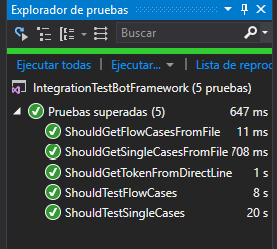
Remember that all the code is stored in my github in this repository.