Bot Framework와 DirectLine을 이용한 통합 테스트 (3)
이것은 가이드의 최신 부분입니다. 이 부분에서는 json에 있는 어설션의 텍스트를 평가할 것입니다.
이제 request를 사용하고 activity를 봇에 보냈으므로 response를 얻었고 json의 assert(json에 저장한 응답, 예상 응답)과 봇에서 얻은 응답을 비교해야 합니다.
다음 설명에서는 Bot Framework 작동 방식에 대한 모든 기본 정보를 다루지 않습니다. 이해가 되지 않는 경우 공식 문서를 확인하세요.
솔루션에 Microsoft.CodeAnalytic 추가
우선 CodeAnalytic을 NuGet 패키지로 포함해야 합니다.
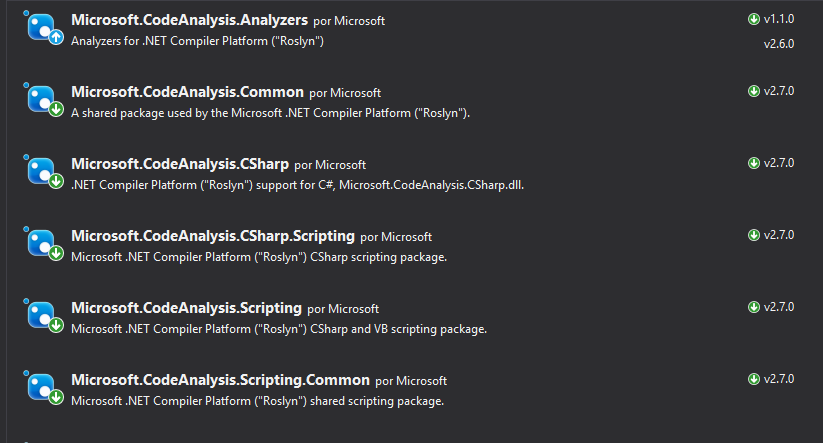
설치 후에는 .cs 파일에 패키지를 추가해야 합니다.
using Microsoft.CodeAnalysis.CSharp.Scripting;
Globals 객체 생성
평가하려면 매개변수를 평가자에게 전달해야 합니다. 이 평가자에는 구성 파일이 필요합니다.
 /// <summary>
/// Object to pass parameters to Roslyn compiler
/// </summary>
public class Globals
{
    /// <summary>
    /// ExpectedResponse
    /// </summary>
    public Activity Request;
    /// <summary>
    /// ReceivedResponse
    /// </summary>
    public Activity Response;
}
이 부분은 매우 중요합니다. 해당 구성 파일에는 비교할 객체가 포함되므로 예상 응답과 응답을 전달해야 합니다.
해당 정보를 사용하여 json 파일의 assert을 사용하고 내용을 평가합니다.
/// Arrange with new values
var globals = new Objects.Globals { Request = entry.Response, Response = latestResponse };

/// Assert
Assert.IsTrue(await CSharpScript.EvaluateAsync<bool>(entry.Assert, globals: globals));
EvaluateAsync<T>는 T를 평가하고 반환합니다. 이 경우 평가할 string와 평가할 데이터가 있는 globals를 전달합니다.
나는 항목(이름, 요청, 응답 및 주장이 있음)을 사용하여 예를 들어 이것을 설명하려고 합니다.
{
      "name": "DecirHola",
      "request": {
        "type": "message",
        "text": "Hola",
        "from": {
          "id": "default-user",
          "name": "User"
        },
        "locale": "es",
        "textFormat": "plain",
        "timestamp": "2018-04-09T08:04:37.195Z",
        "channelData": {
          "clientActivityId": "1523261059363.6264723268323733.0"
        },
        "entities": [
          {
            "type": "ClientCapabilities",
            "requiresBotState": true,
            "supportsTts": true,
            "supportsListening": true
          }
        ],
        "id": "61hacck8j6jg"
      },
      "response": {
        "type": "message",
        "timestamp": "2018-04-09T08:04:37.901Z",
        "localTimestamp": "2018-04-09T09:04:37+01:00",
        "serviceUrl": "http://localhost:50629",
        "channelId": "emulator",
        "from": {
          "id": "j98bbdf097a",
          "name": "Bot"
        },
        "conversation": {
          "id": "eabcie4be8ak"
        },
        "recipient": {
          "id": "default-user"
        },
        "locale": "es",
        "text": "No tengo respuesta para eso.",
        "attachments": [],
        "entities": [],
        "replyToId": "61hacck8j6jg",
        "id": "47me557ikbf7"
      },
      "assert": "Request.Text == Response.Text"
    }
이 항목에서 중요한 사항을 알아봅시다. 먼저 **"assert": "Request.Text == Response.Text"**를 주장합니다. 이는 Request.Text를 Response.Text와 비교하고 값을 부울로 반환한다는 의미입니다.
그러나 await CSharpScript.EvaluateAsync<bool>(entry.Assert, globals: globals) 함수를 호출할 때 2개의 매개변수를 전달합니다.
string평가할 문자열 ->"Request.Text == Response.Text"- 평가자를 위한
globals데이터 -> 이 경우Request및Response를 제공해야 합니다. 요청은 예상 응답이고 응답은 수신된 응답입니다.
평가자에 데이터를 채우는 동안 이제 문자열을 사용하여 평가할 수 있으므로 true 또는 false가 반환됩니다.
완료
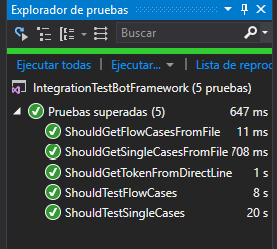
끝났습니다. 여기서 완성된 TestMethod를 볼 수 있습니다.
[TestMethod]
public async Task ShouldTestSingleCases()
{
    // Load entries from file
    var path = System.IO.File.ReadAllText(@"C:\data.json");

    // Deserialize to object
    var data = JsonConvert.DeserializeObject<TestEntriesCollection>(path);

    /// Flow: Arrange -> Act -> arrange -> assert

    foreach (TestEntry entry in data.Entries)
    {
        /// Arrange with current requested values
        string token, newToken, conversationId;

        if (entry.Request.Type == ActivityTypes.Message)
        {
            /// Act

            /// 1 - Get token using secret from DirectLine in BotFramework panel
            token = Utils.uploadString<DirectLineAuth>(data.Secret, data.DirectLineGenerateTokenEndpoint, "").token;

            /// 2 -Create a new conversation
            var createdConversation = Utils.uploadString<DirectLineAuth>(token, data.DirectLineConversationEndpoint, "");

            // This returns a new token and a conversationId
            newToken = createdConversation.token;
            conversationId = createdConversation.conversationId;

            /// 3 - Send an activity to the conversation with new token and conversationId
            string directlineConversationActivitiesEndpoint = data.DirectLineConversationEndpoint + conversationId + "/activities";
            Utils.uploadString<DirectLineAuth>(newToken, directlineConversationActivitiesEndpoint, JsonConvert.SerializeObject(entry.Request));

            /// 4 - Get all activities, we get a List<activity> and a watermark
            var getLastActivity = Utils.downloadString<ActivityResponse>(newToken, directlineConversationActivitiesEndpoint);

            /// 5 - Get the latest activity which is the response we should be expecting
            var latestResponse = getLastActivity.activities[Int32.Parse(getLastActivity.watermark)];

            /// Arrange with new values
            var globals = new Objects.Globals { Request = entry.Response, Response = latestResponse };

            /// Assert
            Assert.IsTrue(await CSharpScript.EvaluateAsync<bool>(entry.Assert, globals: globals));
        }
    }
    await Task.CompletedTask;
}
다이어그램
다음은 이 지점을 얻기 위해 우리가 따른 모든 흐름에 대한 다이어그램입니다. 이해하지 못한 부분이 있으면 이를 통해 문제가 해결되기를 바랍니다.

이것이 전부입니다. 이는 사례가 1:1인 단일 사례에 대해 수행되며 사용자는 activity를 보내고 봇은 또 다른 단일 activity를 반환합니다.
마음에 드셨기를 바랍니다. 다음은 응답이 두 개 이상인 테스트 흐름 사례입니다.
모든 코드는 내 github의 this 저장소에 저장되어 있습니다.