フローケースの Bot Framework と DirectLine を使用した統合テスト
はじめに
前回のブログ投稿では、単一のケースに対していくつかの統合テストを実行しました。 「単一ケース」とは、ボットに何かを質問した後、ボットが 1 回だけ応答し、その結果を比較するケースです。
このガイドでは、認証と API 呼び出しがどのように行われるかについては説明しません。確認したい場合は、単一のケースのガイドを参照してください。
フロー会話についてはどうですか?
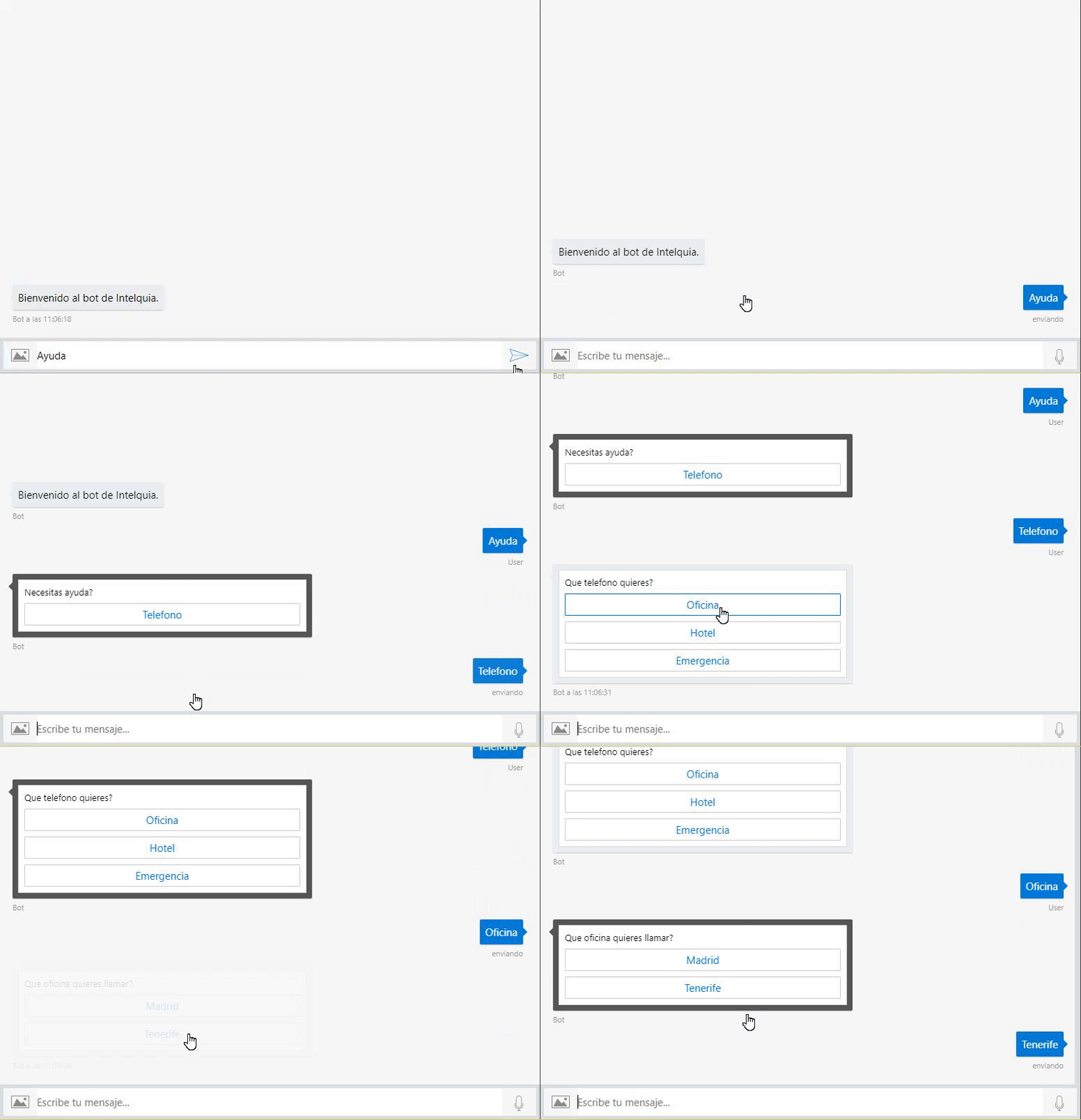
現在の方法では、会話にいかなる流れもありません。たとえば、助けを求めたい場合に、さまざまなオプションを含むメニューが表示され、そのうちの 1 つを選択した後に別のメニューが表示される場合です。これにより、2 つ以上の responses が作成されます。 つまり、以前に使用した統合テスト ソリューションは機能しないということになります。
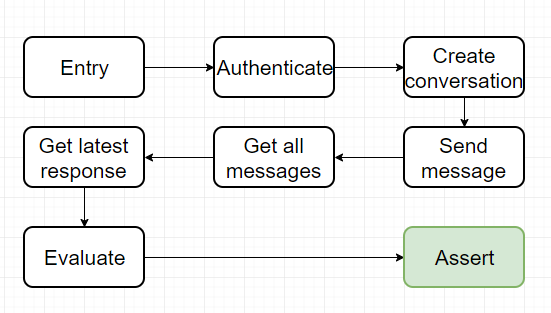
以下は、単一ケースの統合テストがどのように機能するかを示す図です。
これは、現在の統合テスト ソリューションをフロー ケースにどのように適応させるかを示す図です。

次の説明では、Bot Framework の動作に関する基本情報がすべて網羅されているわけではありません。理解できない場合は、公式ドキュメントを確認してください。
ケース例
次のガイドでは、私が作成したフロー会話を備えたボットを使用します。これは、助けを求め、さまざまなオプションを選択します。
新しい JSON 構造
ボットと通信するときに複数の request があるため、json 構造を変更して、これから実行するすべての request を追加する必要があります。
{
  "secret": "direct-line-secret",
  "directlineGenerateTokenEndpoint":
    "https://directline.botframework.com/v3/directline/tokens/generate",
  "directlineConversationEndpoint":
    "https://directline.botframework.com/v3/directline/conversations/",
  "entries": [
    {
      "name": "PedirAyuda",
      "requests": [
        {
          "type": "message",
          "text": "Ayuda",
          "from": {
            "id": "default-user",
            "name": "User"
          },
          "locale": "es",
          "textFormat": "plain",
          "timestamp": "2018-04-09T08:04:37.195Z",
          "channelData": {
            "clientActivityId": "1523261059363.6264723268323733.0"
          },
          "entities": [
            {
              "type": "ClientCapabilities",
              "requiresBotState": true,
              "supportsTts": true,
              "supportsListening": true
            }
          ],
          "id": "61hacck8j6jg"
        },
        {
          "type": "message",
          "text": "Telefono",
          "from": {
            "id": "default-user",
            "name": "User"
          },
          "locale": "es",
          "textFormat": "plain",
          "timestamp": "2018-04-09T08:04:37.195Z",
          "channelData": {
            "clientActivityId": "1523261059363.6264723268323733.0"
          },
          "entities": [
            {
              "type": "ClientCapabilities",
              "requiresBotState": true,
              "supportsTts": true,
              "supportsListening": true
            }
          ],
          "id": "61hacck8j6jg"
        },
        {
          "type": "message",
          "text": "Oficina",
          "from": {
            "id": "default-user",
            "name": "User"
          },
          "locale": "es",
          "textFormat": "plain",
          "timestamp": "2018-04-09T08:04:37.195Z",
          "channelData": {
            "clientActivityId": "1523261059363.6264723268323733.0"
          },
          "entities": [
            {
              "type": "ClientCapabilities",
              "requiresBotState": true,
              "supportsTts": true,
              "supportsListening": true
            }
          ],
          "id": "61hacck8j6jg"
        },
        {
          "type": "message",
          "text": "Tenerife",
          "from": {
            "id": "default-user",
            "name": "User"
          },
          "locale": "es",
          "textFormat": "plain",
          "timestamp": "2018-04-09T08:04:37.195Z",
          "channelData": {
            "clientActivityId": "1523261059363.6264723268323733.0"
          },
          "entities": [
            {
              "type": "ClientCapabilities",
              "requiresBotState": true,
              "supportsTts": true,
              "supportsListening": true
            }
          ],
          "id": "61hacck8j6jg"
        }
      ],
      "response": {
        "type": "message",
        "timestamp": "2018-04-09T08:04:37.901Z",
        "localTimestamp": "2018-04-09T09:04:37+01:00",
        "serviceUrl": "http://localhost:50629",
        "channelId": "emulator",
        "from": {
          "id": "j98bbdf097a",
          "name": "Bot"
        },
        "conversation": {
          "id": "eabcie4be8ak"
        },
        "recipient": {
          "id": "default-user"
        },
        "locale": "es",
        "text": "922920252",
        "attachments": [],
        "entities": [],
        "replyToId": "61hacck8j6jg",
        "id": "47me557ikbf7"
      },
      "assert": "Request.Text == Response.Text"
    }
  ]
}
ご覧のとおり、重要な変更があり、request は requests になりました。つまり、単一の activity ではなく List<Activity> が存在することになります。
新しいオブジェクト
以前は、TestEntry と TestEntryCollection という単一のケースに対してオブジェクトを設定していました。フローケースの場合は、新しいオブジェクト TestEntryFlow および TestEntryFlowCollection を作成します。
TestEntryFlow
このオブジェクトはコレクション内にあるすべてのエントリに対応しています。前に述べたように、Requests オブジェクトが単一の Activity ではなく List<Activity> になっていることがわかります。
ボットに複数回質問するため、会話に送信される複数の activities が必要です。
public class TestEntryFlow
{
    /// <summary>
    /// Entry name
    /// </summary>
    [JsonProperty("name")]
    public string Name { get; set; }
    /// <summary>
    /// Activity requested by the entry
    /// </summary>
    [JsonProperty("requests")]
    public List<Activity> Requests { get; set; }
    /// <summary>
    /// Activity response expected by the entry
    /// </summary>
    [JsonProperty("response")]
    public Activity Response { get; set; }
    /// <summary>
    /// Assert value in string
    /// </summary>
    [JsonProperty("assert")]
    public string Assert { get; set; }
}
TestEntiresCollection
このオブジェクトには、secret やエンドポイントなどの DirectLine の関連情報に加えて、テストする Entries のリストが含まれます。
Entries は TestEntry ではなく TestEntryFlow のリストになっていることに注意してください。
public class TestEntryFlowCollection
{
    /// <summary>
    /// DirectLine Secret
    /// </summary>
    [JsonProperty("secret")]
    public string Secret { get; set; }
    /// <summary>
    /// Endpoint to get the token using the secret for DirectLine
    /// </summary>
    [JsonProperty("directlineGenerateTokenEndpoint")]
    public string DirectLineGenerateTokenEndpoint { get; set; }
    /// <summary>
    /// Endpoint for a conversation in DirectLine
    /// </summary>
    [JsonProperty("directlineConversationEndpoint")]
    public string DirectLineConversationEndpoint { get; set; }
    /// <summary>
    /// Entries list
    /// </summary>
    [JsonProperty("entries")]
    public List<TestEntryFlow> Entries { get; set; }
}
フローケースの TestMethod を作成する
新しいフロー
まず、もう一度図を見てください(上に投稿したものと同じです)。
ご覧のとおり、テストを行うためのフロー構造はほぼ同じです。
情報を入手する
認証する
会話を作成するそして、ここで何が変わるのか、今度はすべてのリクエストを会話に複数回送信する必要があります。これを行うには、リクエストごとにループしてボットに送信し、最新の応答を予想される応答と比較する必要があります。
すべてのリクエストを送信する
すべてのメッセージを取得する
最新の応答を取得する
期待される応答と比較する
結果のアサート
コード
まず最初に、ファイルから情報を取得する必要があります。これは、以前に単一のケースで行ったのと同じです。
// Load entries from file
var path = System.IO.File.ReadAllText(@"C:\dataFlow.json");

// Deserialize to object
var data = JsonConvert.DeserializeObject<TestEntryFlowCollection>(path);
ここで、data.entries の TestEntryFlow ごとにループする必要があります。これにより、requests でループする新しい部分まで、単一のケースで行ったのと同じフローに従うことができます。
/// Arrange with current requested values
string token, newToken, conversationId;
Activity latestResponse = new Activity();

/// Act for step

/// 1 - Get token using secret from DirectLine in BotFramework panel
token = Utils.uploadString<DirectLineAuth>(data.Secret, data.DirectLineGenerateTokenEndpoint, "").token;

/// 2 - Create a new conversation
var createdConversation = Utils.uploadString<DirectLineAuth>(token, data.DirectLineConversationEndpoint, "");

// This returns a new token and a conversationId
newToken = createdConversation.token;
conversationId = createdConversation.conversationId;

/// 3 - Send an activity to the conversation with new token and conversationId
string directlineConversationActivitiesEndpoint = data.DirectLineConversationEndpoint + conversationId + "/activities";
次のステップは非常に簡単です。entry.requests をループして、すべての activity を会話に送信する必要があります。
foreach (Activity step in entry.Requests)
{
    if (step.Type == ActivityTypes.Message)
    {
        /// Step
        Utils.uploadString<DirectLineAuth>(newToken, directlineConversationActivitiesEndpoint, JsonConvert.SerializeObject(step));

        /// 4 - Get all activities, we get a List<activity> and a watermark
        var getLastActivity = Utils.downloadString<ActivityResponse>(newToken, directlineConversationActivitiesEndpoint);

        /// 5 - Get the latest activity which is the response we should be expecting
        latestResponse = getLastActivity.activities[Int32.Parse(getLastActivity.watermark)];
    }
}
最新のメッセージを取得するには watermark を使用します。watermark は、会話情報を要求するときに DirectLine API が返す値です。
その後、globals に latestReponse と expectedResponse を入力するだけです。
/// Arrange with new values
var globals = new Objects.Globals { Request = entry.Response, Response = latestResponse };
そしてこのケースを終了するには、entry 内の assert 文字列を評価します。
/// Assert
Assert.IsTrue(await CSharpScript.EvaluateAsync<bool>(entry.Assert, globals: globals));
最終コード
[TestMethod]
public async Task ShouldTestFlowCases()
{
    // Load entries from file
    var path = System.IO.File.ReadAllText(@"C:\dataFlow.json");

    // Deserialize to object
    var data = JsonConvert.DeserializeObject<TestEntryFlowCollection>(path);

    /// Flow: Arrange -> Act -> arrange -> assert
    foreach (TestEntryFlow entry in data.Entries)
    {
        /// Arrange with current requested values
        string token, newToken, conversationId;
        Activity latestResponse = new Activity();

        /// Act for step

        /// 1 - Get token using secret from DirectLine in BotFramework panel
        token = Utils.uploadString<DirectLineAuth>(data.Secret, data.DirectLineGenerateTokenEndpoint, "").token;

        /// 2 -Create a new conversation
        var createdConversation = Utils.uploadString<DirectLineAuth>(token, data.DirectLineConversationEndpoint, "");

        // This returns a new token and a conversationId
        newToken = createdConversation.token;
        conversationId = createdConversation.conversationId;

        /// 3 - Send an activity to the conversation with new token and conversationId
        string directlineConversationActivitiesEndpoint = data.DirectLineConversationEndpoint + conversationId + "/activities";

        foreach (Activity step in entry.Requests)
        {
            if (step.Type == ActivityTypes.Message)
            {
                /// Step
                Utils.uploadString<DirectLineAuth>(newToken, directlineConversationActivitiesEndpoint, JsonConvert.SerializeObject(step));

                /// 4 - Get all activities, we get a List<activity> and a watermark
                var getLastActivity = Utils.downloadString<ActivityResponse>(newToken, directlineConversationActivitiesEndpoint);

                /// 5 - Get the latest activity which is the response we should be expecting
                latestResponse = getLastActivity.activities[Int32.Parse(getLastActivity.watermark)];
            }
        }

        /// Arrange with new values
        var globals = new Objects.Globals { Request = entry.Response, Response = latestResponse };

        /// Assert
        Assert.IsTrue(await CSharpScript.EvaluateAsync<bool>(entry.Assert, globals: globals));
    }

    await Task.CompletedTask;
}
改善点
より良いフローが可能であると信じていますが、この改善は JSON 構造も変更する必要があることを意味します。また、これを実現するには、JSON をさらに埋める必要があります。
このテストをより良くするには、request ごとに response を用意し、メッセージを送信するたびにアサートする必要があります。私たちが現在それを行っている方法は、すべての requests と 最後の response を保存することです。
これがどのようになるかを示す図を作成しました。
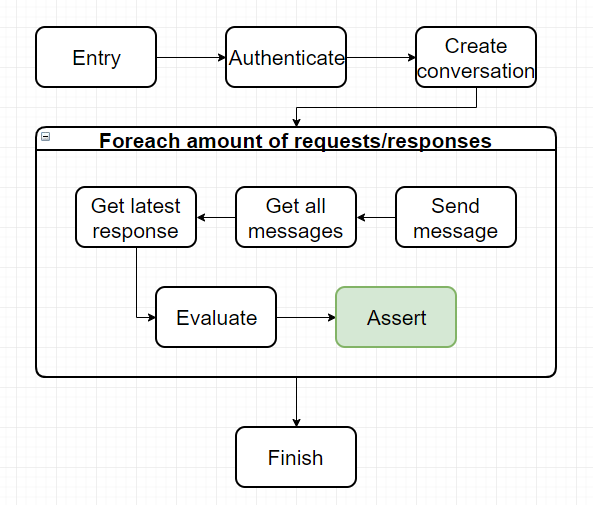
最終的な応答だけをテストするのではなく、フロー内のほぼすべての動作をテストするため、テストの整合性という点ではこの方法の方が全体的にはるかに優れていると私は強く思います。
このガイドはこれですべてです。このガイドは単一ケース ガイドの続きであることを覚えておいてください。迷った場合は、より長く、すべてについてより多くの説明が記載されているガイドを確認してください。
すべてのコードは私の github の this リポジトリに保存されていることに注意してください。
良い一日を!