Bot FrameworkとDirectLineを使った連携テスト(3)
これはガイドの最新の部分です。この部分では、json のアサーションからテキストを評価します。
request を使用し、activity としてボットに送信したので、response を取得しました。そして、json 内の assert (json に保存した応答。これは予想される応答です) とボットから取得した応答を比較する必要があります。
次の説明では、Bot Framework の動作に関する基本情報がすべて網羅されているわけではありません。理解できない場合は、公式ドキュメントを確認してください。
Microsoft.CodeAnalysis をソリューションに追加する
まず、CodeAnalysis を NuGet パッケージとして含める必要があります。
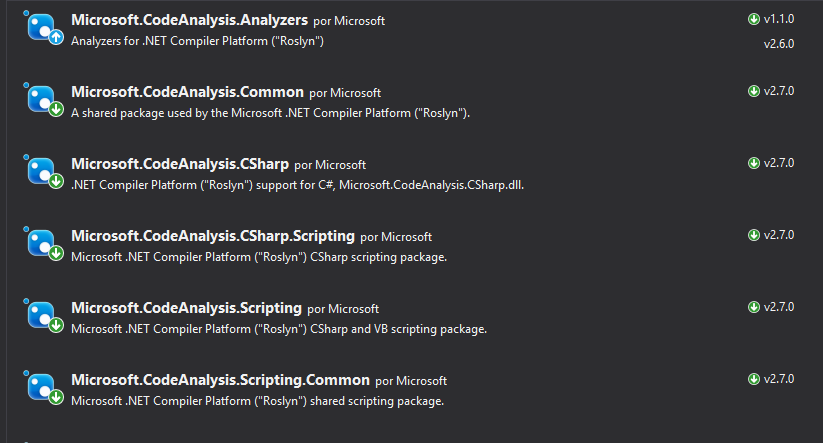
インストール後、忘れずにパッケージを .cs ファイルに追加してください。
using Microsoft.CodeAnalysis.CSharp.Scripting;
Globals オブジェクトの作成
評価するには、パラメータを評価者に渡す必要があります。このエバリュエーターには構成ファイルが必要です。
 /// <summary>
/// Object to pass parameters to Roslyn compiler
/// </summary>
public class Globals
{
    /// <summary>
    /// ExpectedResponse
    /// </summary>
    public Activity Request;
    /// <summary>
    /// ReceivedResponse
    /// </summary>
    public Activity Response;
}
この部分は非常に重要です。その構成ファイルには、比較するオブジェクトが含まれるため、期待される応答と受信した応答を渡す必要があります。
その情報を使用して、json ファイル内の assert を使用し、その内容を評価します。
/// Arrange with new values
var globals = new Objects.Globals { Request = entry.Response, Response = latestResponse };

/// Assert
Assert.IsTrue(await CSharpScript.EvaluateAsync<bool>(entry.Assert, globals: globals));
EvaluateAsync<T> は T を評価して返します。この例では、評価する string と、評価対象のデータを持つ globals を渡します。
エントリ(名前、リクエスト、レスポンス、アサートを持つ)を使用した例でこれを説明してみます。
{
      "name": "DecirHola",
      "request": {
        "type": "message",
        "text": "Hola",
        "from": {
          "id": "default-user",
          "name": "User"
        },
        "locale": "es",
        "textFormat": "plain",
        "timestamp": "2018-04-09T08:04:37.195Z",
        "channelData": {
          "clientActivityId": "1523261059363.6264723268323733.0"
        },
        "entities": [
          {
            "type": "ClientCapabilities",
            "requiresBotState": true,
            "supportsTts": true,
            "supportsListening": true
          }
        ],
        "id": "61hacck8j6jg"
      },
      "response": {
        "type": "message",
        "timestamp": "2018-04-09T08:04:37.901Z",
        "localTimestamp": "2018-04-09T09:04:37+01:00",
        "serviceUrl": "http://localhost:50629",
        "channelId": "emulator",
        "from": {
          "id": "j98bbdf097a",
          "name": "Bot"
        },
        "conversation": {
          "id": "eabcie4be8ak"
        },
        "recipient": {
          "id": "default-user"
        },
        "locale": "es",
        "text": "No tengo respuesta para eso.",
        "attachments": [],
        "entities": [],
        "replyToId": "61hacck8j6jg",
        "id": "47me557ikbf7"
      },
      "assert": "Request.Text == Response.Text"
    }
このエントリから重要なことを理解しましょう。まず、アサート "assert": "Request.Text == Response.Text" です。これは、Request.Text と Response.Text を比較し、値をブール値として返すことを意味します。
ただし、関数 await CSharpScript.EvaluateAsync<bool>(entry.Assert, globals: globals) を呼び出すときは、2 つのパラメーターを渡します。
string評価する文字列 ->"Request.Text == Response.Text"- 評価者用の
globalsデータ -> この場合、RequestとResponseを与える必要があります。リクエストは 期待される応答で、応答は 受信された応答です。
エバリュエーターにデータを入力しているので、文字列を使用して評価できるようになり、true または false が返されます。
完了
これで完了です。完成した TestMethod をご覧ください。
[TestMethod]
public async Task ShouldTestSingleCases()
{
    // Load entries from file
    var path = System.IO.File.ReadAllText(@"C:\data.json");

    // Deserialize to object
    var data = JsonConvert.DeserializeObject<TestEntriesCollection>(path);

    /// Flow: Arrange -> Act -> arrange -> assert

    foreach (TestEntry entry in data.Entries)
    {
        /// Arrange with current requested values
        string token, newToken, conversationId;

        if (entry.Request.Type == ActivityTypes.Message)
        {
            /// Act

            /// 1 - Get token using secret from DirectLine in BotFramework panel
            token = Utils.uploadString<DirectLineAuth>(data.Secret, data.DirectLineGenerateTokenEndpoint, "").token;

            /// 2 -Create a new conversation
            var createdConversation = Utils.uploadString<DirectLineAuth>(token, data.DirectLineConversationEndpoint, "");

            // This returns a new token and a conversationId
            newToken = createdConversation.token;
            conversationId = createdConversation.conversationId;

            /// 3 - Send an activity to the conversation with new token and conversationId
            string directlineConversationActivitiesEndpoint = data.DirectLineConversationEndpoint + conversationId + "/activities";
            Utils.uploadString<DirectLineAuth>(newToken, directlineConversationActivitiesEndpoint, JsonConvert.SerializeObject(entry.Request));

            /// 4 - Get all activities, we get a List<activity> and a watermark
            var getLastActivity = Utils.downloadString<ActivityResponse>(newToken, directlineConversationActivitiesEndpoint);

            /// 5 - Get the latest activity which is the response we should be expecting
            var latestResponse = getLastActivity.activities[Int32.Parse(getLastActivity.watermark)];

            /// Arrange with new values
            var globals = new Objects.Globals { Request = entry.Response, Response = latestResponse };

            /// Assert
            Assert.IsTrue(await CSharpScript.EvaluateAsync<bool>(entry.Assert, globals: globals));
        }
    }
    await Task.CompletedTask;
}
図
ここで、この点を理解するために私たちがたどったすべてのフローを図に示します。理解できなかったことがあれば、これで理解できると思います。

これですべてです。これは、ケースが 1 対 1 で、ユーザーが activity を送信し、ボットが別の単一の activity を返す単一のケースに対して行われます。
気に入っていただければ幸いです。次は、複数の応答があるテスト フロー ケースです。
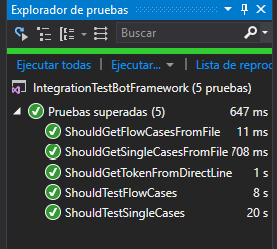
すべてのコードは私の github の this リポジトリに保存されていることに注意してください。